

Research your agents can rely on.
Search, read and cite public sources — even when ordinary fetch tools come back with an empty page.
One integration gives your agents real research: Search finds the sources, reads them in full — including sites that block ordinary tools — and remembers what it read.
- Installs in a minute — Claude Code and Codex from the marketplace; any MCP client via one endpoint.
- Reads what other tools can't — a full browser opens the sites that block them, with no per-source setup.
- Fast, and cheap to repeat — under a second on a warm read; repeat reads come from a 24-hour cache.
- Discover, then extract — schema: true returns the shape; select returns fields from JSON or XML/RSS, or whole sections from markdown. 1.26 MB → 28 KB in the worked example.
- On the record — every search and read recorded for your workspace, with the page as the agent received it.
- Honest about failure — an unreadable page is reported with the reason, never summarised from nothing.
Discover the shape first, then ask for exactly the fields — click each call to see what comes back. The 1.26 MB response stays on the server; 28 KB reaches the agent. Real capture →
{ "ahead_by": "number",
  "total_commits": "number",
  "commits[]": { "$items": 52,
    "sha": "string",
    "commit": { "message": "string", … } },
  "files[]": { "$items": 183,
    "filename": "string",
    "patch": "string", … } }

Keys are select paths — copy, don't translate.
The 1.26 MB body never left the server.
~315,000 tokens of author objects,
verification blocks and 183 per-file
patches — more than most context
windows hold, for a two-line question.

This is what reaches the agent when the
tool can't trim server-side.
{ "ahead_by": 52, "total_commits": 52,
  "commits": [
    { "sha": "22dc605c4ead…",
      "commit": { "message":
        "ci: fix vulkan llvmpipe runs (#26533)" } },
    { "sha": "935cad6497e8…",
      "commit": { "message":
        "llama : move n_vocab from llama_sampler…" } },
    … 50 more rows, rows stay aligned ] }
Pinned build b10256 is 52 commits behind
b10308.

Notable: Qwen3-TTS support lands in
llama-tts (breaking CLI change); AMD ROCm
gfx1151 joins CI; the GGUF reader is
hardened against crafted-file OOM.

Source: api.github.com compare b10256...b10308,
read 8 Aug 2026 via select — 28 KB of a 1.26 MB
response reached the agent (~2%).
Read a page · test
Enter a public URL. Levirge Search opens the page in a real, full browser and returns proof of the read: HTTP status, page title and size. Nothing else.
A page that can't be read is reported with the reason — never summarised from nothing. That's the point.
Agents are only as good as what they can reach
The most valuable sources block ordinary tools — and a blocked agent doesn't stop. It answers from less, and presents it as the source.
| Without Search | With Levirge Search | |
|---|---|---|
| Blocked sites | A 403, a CAPTCHA, or an empty page | A real browser opens the page; the source is remembered |
| Confident guesses | The agent answers from search snippets — a summary of a summary | Failures reported with the reason; every answer traceable to its page |
| Fenced tools | Blocklists; constructed URLs refused; raw HTTP forbidden | One sanctioned MCP integration — any URL the agent builds |
| DIY glue | Search API + scraper + browser service, yours to maintain | Find and read in one integration |
| Context cost | A 200 KB page for a two-line question, on every read | Ask for fields — 1.26 MB → 28 KB — with a 24 h cache |
"Without" column: Claude Code's native WebFetch, tested 8 Aug 2026 — captured verbatim in the examples. Other clients differ in detail, not outcome.
What agents send, what comes back
One integration exposes six tools — search, fetch, fetch_async, fetch_results, stealth_list, stealth_add — grouped here into four workflows. Markdown pages arrive with a route note; JSON and XML/RSS bodies come back raw and parseable.
| Tool | Get back | Use it when | On failure |
|---|---|---|---|
| searchquery, limit? | Ranked {title, url, content}Proof: captured trace → | No URL yet — find candidate sources | The error comes back, not an empty answer |
| fetchurl, select?, schema?, max_bytes?, headers? | Clean markdown with a route note; raw JSON or XML for APIs and feeds. select returns just the fields — jq-lite paths on JSON and XML/RSS, attributes as @name — or whole matching sections (markdown); schema: true returns select-ready paths for JSON/XML, a heading outline for markdownProof: blocked portal → · 1.26 MB → 28 KB → | You have the URL and want it read — or want an unknown API's shape first | Reported with the reason — never an empty page |
| fetch_async + fetch_resultsurls | Immediate acknowledgement, then done / pending / failed per URLProof: captured run → | A list of pages to read without holding the conversation open | Failed URLs listed; resubmit to retry |
| stealth_list / stealth_adddomain | The registry of sources that need the full browserProof: captured error → | You already know a source blocks plain fetches | — |
A typical page is a few KB of markdown; select narrows the rest server-side — fields from JSON and XML/RSS, whole sections from markdown — before anything touches your agent's context.
Stop paying for words your agent didn't need
A two-megabyte source used to be your problem. Ask Levirge Search for the part you actually need and that's what comes back — in one captured run, a 1.26 MB API response became 28 KB. The rest is kept for 24 hours, so follow-ups are answered from cache.
Less context burned. Cheaper calls. Sharper answers.
See what your agent read
Every search and every source, with the page the agent actually read — the content, not a log line, available for 24 hours after the read.
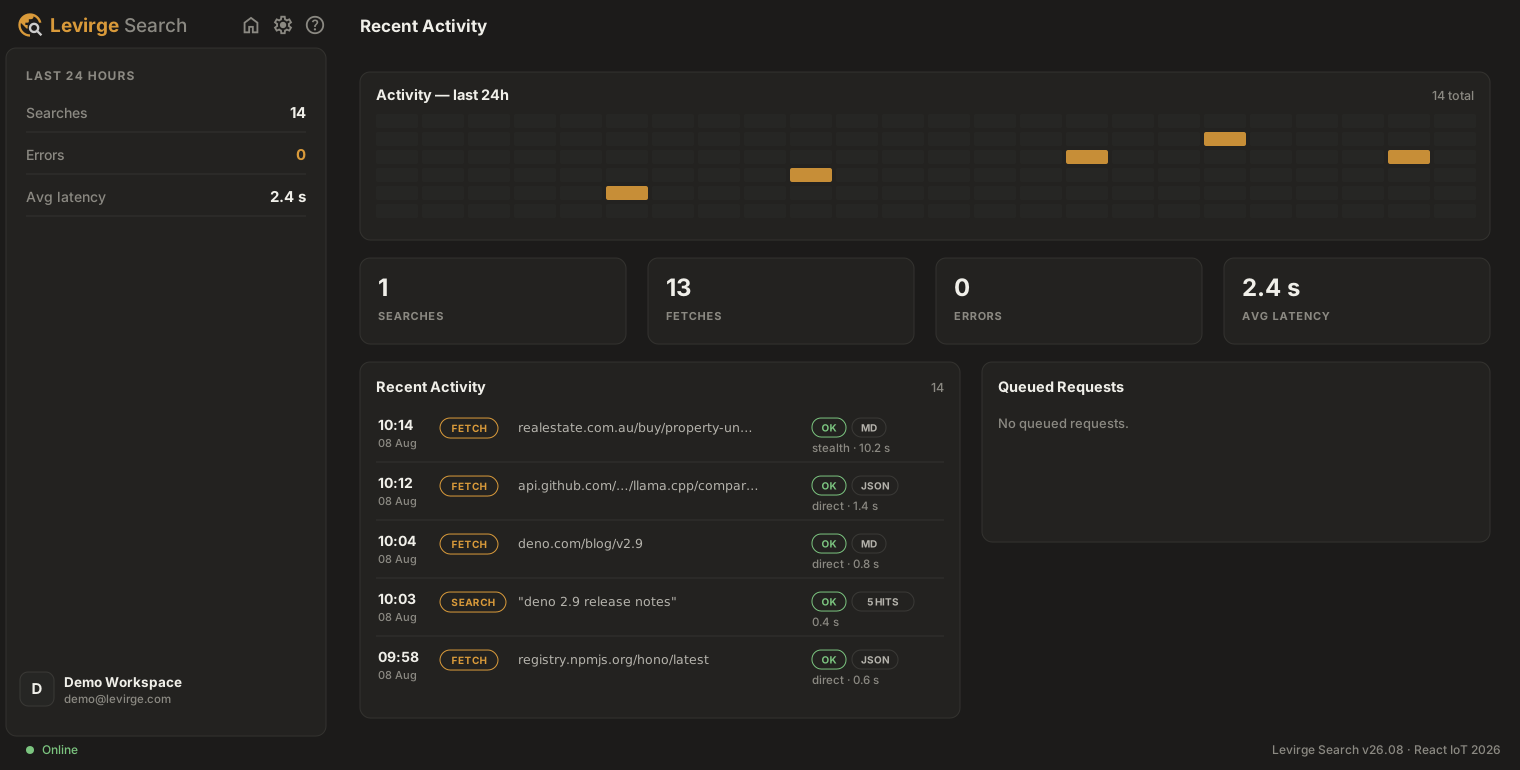
Your workspace is yours alone — separate from every other customer's, with per-user access you issue and revoke yourself.
Agents call tools; Search does the reading
An agent calls search or fetch. Every read passes a cache check, per-source pacing and a concurrency guard before a browser is opened — direct where that works, a full browser where the source needs one — then the content comes back over the same surface.
Search reads pages a person could open in their own browser. It is not a way around a paywall or a login.
Access, limits and what we keep
Public sources, read at a human pace
Search reads pages a person could open in their own browser. It is not a way around a paywall or a login, and it won't pretend to be. Per-source pacing with jitter and a concurrency guard protect the sites being read — bulk scraping isn't supported, and workspaces detected scraping are suspended and investigated.
Your workspace, your tokens
Separate from every other customer's, with per-user access tokens you issue and revoke yourself, and usage you can see by user. We host it; if research needs to run somewhere specific, talk to us about deployment options.
What we keep, and for how long
Every search and read is recorded for your workspace — URL, outcome, timestamp. The page as the agent received it stays available for 24 hours, then expires; the record stays.
Pricing
Unlimited search and open fetch on every plan — from $29/mo for one person to $199/mo for a team of five. Plans meter only full-browser capacity, the one resource that's scarce. See plans →
Pick your agent, paste the command
Claude Code and Codex install from the built-in marketplace; every other MCP client connects to the same endpoint.
Early access — capacity is limited and workspaces are set up in order of request. Installing now is fine: the plugin connects the moment your workspace is active.
claude plugin marketplace add levirge/search
claude plugin install search@levirge-search
Installs the /search:* commands and connects the MCP server — sign in with OAuth on first use; workspace tokens remain as a fallback.
Settings → Plugins → Add → Add marketplace, paste the repo, then Sync and install Search:
levirge/search
Step-by-step with screenshots → Sign in with OAuth on first use.
codex plugin marketplace add https://github.com/levirge/search
Or add the MCP server to ~/.codex/config.toml:
[mcp_servers.search]
url = "https://search.levirge.com/mcp"
# Token fallback — env var holding your bearer token:
bearer_token_env_var = "SEARCH_TOKEN"
https://search.levirge.com/mcp
Add it as a remote MCP server in your OpenCode config. The endpoint speaks Streamable HTTP; sign in with OAuth when prompted, or send Authorization: Bearer <token> as a fallback.
https://search.levirge.com/mcp
Add it as a remote MCP server in pi.dev. The endpoint speaks Streamable HTTP; sign in with OAuth when prompted, or send Authorization: Bearer <token> as a fallback.
- discovery
- levirge.com/llms.txt
- docs
- levirge.com/search.md
- endpoint
- https://search.levirge.com/mcp
- definition
- levirge.com/search/mcp.json
- auth
- OAuth sign-in · bearer token as fallback
- verify
- call stealth_list — read-only
- tools
- 6 — search · fetch · fetch_async · fetch_results · stealth_list · stealth_add
Restart your client after installing (on claude.ai, remove and re-add the connector), then ask a research question — /search:research to start. Connecting by hand? The endpoint speaks Streamable HTTP; REST is available too.
Give your agents something real to read
Install in your client in about a minute — or have an engineer walk you through it live, on a source that stops ordinary tools.