

One brain for all your agents & users.
Give Claude, Codex and any MCP client — and the people working beside them — shared knowledge, reusable skills, and a reliable way to hand work to each other.
Knowledge & Learnings become Siloed
Every session captures knowledge and learnings — and today they stay trapped where they happened: one session, one vendor, one machine, one person. Brain shares them across all of it — over MCP.
A work-continuity system, not a memory store
Most memory products store what was said and hand it back. Brain also holds what your agents are doing — the session they're in, the todos they owe, the skills they follow, the handoffs they left each other — beside the knowledge itself. Four things carry that.
Memory and work in one substrate
ShippedKnowledge is only half of continuity. work_session, todo, skill, handoff and reminder are tools on the same server as the knowledge base — so an agent picking up cold can ask what it was doing, what's still open, and what someone left it.
- What was I doing — work sessions
- What's still owed — todos
- How we do this — versioned skills
- What another agent left me — handoffs
- What comes due later — dated reminders
Scoped per project, not per person
ShippedKnowledge is partitioned by Vault — one per project, product or client. Memory tied to a user account smears every project you touch into one pile; a Vault keeps one client's work out of another client's answers, and lets a whole team share the one that matters.
- A Vault per project, not one bucket per user
- Search, entities and skills scoped to it
- Personal Vaults stay private and fail closed
Humans curate where they already write
ShippedThe Obsidian plugin two-way syncs a local vault against Brain — local edits push, remote changes pull, and a genuine conflict parks the remote copy beside your file instead of overwriting it. The people on the team curate in the editor they already live in; the agents recall it everywhere else.
- Two-way sync between your vault and Brain
- Conflicts parked side by side, never silently resolved
- Search the same knowledge base from your notes
Git-backed Vaults
PlannedA readable markdown mirror of each Vault, committed to a git repo you can hold — diffable, greppable, revertible, and its own exit hatch, because the export format is the repository. Designed, not shipped: it's the next thing we're building, and we'll say so here when it lands.
- One repo per Vault, markdown you can read
- Free tier stays user-managed — your remote or none
- Managed remotes and tested restore are the paid line
- Mirror a managed Vault to your own GitHub or GitLab
Today's storage is Levirge-hosted and tenant-isolated; the git mirror above is the planned durability and exit path, not a feature you can switch on yet.
Turn raw documents into cited knowledge
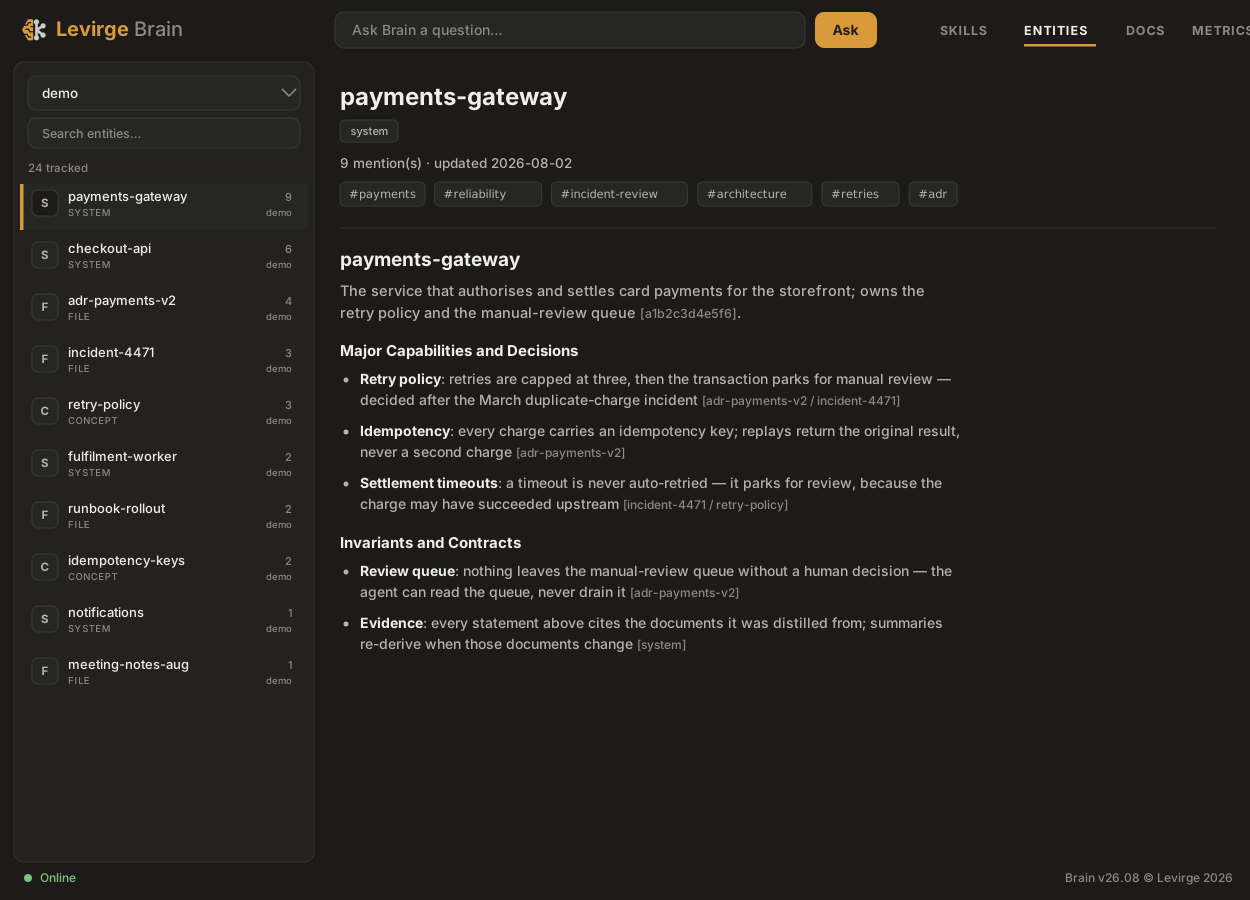
Plenty of products store what you give them. Brain groups incoming material by entity and produces compact summaries an agent can afford to read — each statement linking to the source documents it came from.
When a source changes, Brain rebuilds the affected summary — nobody has to remember to update it. The example below is a real one, distilled from our own August incident. Measured on a benchmark corpus, the same query returns eight fragments without that layer and one cited summary with it — the before/after.
Redeploys kill in-memory MCP sessions and hour-long JWTs — clients reconnect with static per-user API tokens instead. Decided after the August connectivity incidents.
Shared memory, skills and handoffs for AI agents
Knowledge and curation
- Search by meaning — semantic retrieval over everything captured, with source tracking on every fact.
- Cited summaries — per-entity distillations that link to their documents and rebuild when a source changes.
- Context packs — the relevant summaries, documents and relationships for an entity, assembled within a token limit.
- Obsidian plugin — two-way sync between a local vault and Brain; search, publish and pull the same knowledge base from your notes.
Skills and handoffs
- One skills repository — versioned skill bundles served to every connected agent as MCP tools; update one, connected agents pick it up.
- Handoffs with context — agents send, reply and watch an inbox; work moves between agents with its context attached.
- Delivered on reconnect — handoffs that arrive while a watcher is down are delivered on its next watch.
- Dated reminders — park a fact against a future date — a cert expiry, a decision to revisit — and it stays out of the way until then. Brain answers "what's due in the next 30 days"; what happens next is your scheduled agent's call, not a notification we send.
Models and privacy
- Hosted lane — hosted mode runs every model call on LLMs Levirge hosts; no third-party model provider in the path.
- Cloud when you want speed — switch to third-party LLMs from Settings at runtime; no redeploy.
- Local embeddings — vector generation and reranking run on Levirge infrastructure in both modes.
Access and operations
- Tenants and Vaults — knowledge is partitioned per Vault; personal Vaults are private to their owner and fail closed.
- Per-user tokens — hosted sign-in or bearer tokens you issue and revoke; only the hash is stored.
- Ingestion you can see — a board of pending, errored and promoted items, with one-click retry and a health endpoint.
Private by default, fast when you need it
Two model lanes, one runtime switch. Hosted mode runs on LLMs Levirge hosts on its own infrastructure — no third-party model provider in the path. Cloud mode uses third-party LLMs when speed matters more than locality — and workspace data is tenant-isolated in both lanes. Self-hosting the whole system is a roadmap item, not today's offer.
Private by default
In hosted mode, every model call — categorisation, summarisation, chat — runs on LLMs Levirge hosts; no third-party model provider in the path. Flip to cloud LLMs when speed matters more than locality — a runtime setting, not a redeploy. Embeddings and reranking run on Levirge infrastructure in both modes.
We host it
Sign in and connect your clients — there's nothing to operate. Plans start at $20/mo for one person with unlimited agents and vaults; $60/mo puts your corpus on a private model lane. See plans → Self-hosted deployment is a roadmap item for enterprise; if you need Brain to run somewhere specific, that's a conversation worth having with us.
Planned Hosted shouldn't mean held hostage. With git-backed Vaults, a Vault we manage can push-mirror to a repository you control — your GitHub, GitLab or your own server. We keep the working copy; you keep a live replica, continuously, not on request.
Private doesn't mean slow
Private inference keeps pace with ingest — categorisation, summarisation and retrieval run comfortably on a local LLM.
Every agent reads and writes one brain
Agents across every repo and client share the same memory and the same skills — contributing what they learn and drawing on what the others left behind.
One brain, one protocol — agents and users contribute to and draw on the same memory, whatever client it runs in.
Pick your agent
Access is per workspace — register your interest, then connect your clients.
Early access — capacity is limited and workspaces are set up in order of request. Installing now is fine: the plugin connects the moment your workspace is active.
claude plugin marketplace add levirge/brain
claude plugin install brain@brain
Installs the /brain:* commands and connects the MCP server — sign in with OAuth on first use; workspace tokens remain as a fallback.
Settings → Plugins → Add → Add marketplace, paste the repo, then Sync and install Levirge Brain:
levirge/brain
Step-by-step with screenshots → Sign in with OAuth on first use.
codex plugin marketplace add https://github.com/levirge/brain
Or add the MCP server to ~/.codex/config.toml:
[mcp_servers.brain]
url = "https://brain.levirge.com/mcp"
# Token fallback — env var holding your workspace token:
bearer_token_env_var = "BRAIN_TOKEN"
Search, publish and two-way sync the same knowledge base from your notes — the users' door to the brain:
<vault>/.obsidian/plugins/levirge-brain/
Download the release from levirge/brain-obsidian, copy it to the folder above, enable it under Settings → Community plugins, then Connect in Settings → Levirge Brain — OAuth sign-in, same workspace as your agents.
https://brain.levirge.com/mcp
The endpoint speaks Streamable HTTP. Sign in with OAuth when your client prompts, or send Authorization: Bearer <token> as a fallback. Verify with a read-only call: kb_overview. Request access →
- discovery
- levirge.com/llms.txt
- docs
- levirge.com/brain.md
- endpoint
- https://brain.levirge.com/mcp
- definition
- levirge.com/brain/mcp.json
- auth
- OAuth sign-in · bearer token as fallback
- verify
- call kb_overview — read-only
- tools
- 19 — brain.md for agents, docs for humans
Give your whole fleet one memory
One server, every team member. Shared knowledge that curates itself across agents and users, skills you edit once, and handoffs that carry their context.